React SDK
The @korala/react package provides React components and hooks for embedding document signing in your application.
Installation
npm install @korala/react
# or
yarn add @korala/react
# or
pnpm add @korala/react
Quick Start
import { KoralaSigner } from '@korala/react';

function SigningPage({ token }: { token: string }) {
  return (
    <KoralaSigner
      token={token}
      signingUrl="https://app.korala.ai"
      style={{ width: '100%', height: '800px' }}
      onSigned={(data) => {
        console.log('Document signed!', data.documentId);
      }}
      onError={(data) => {
        console.error('Signing error:', data.message);
      }}
    />
  );
}
Components
KoralaSigner
Renders an embedded signing iframe. The signer views the document and completes all assigned fields without leaving your app, from typed text fields to drawn signatures. The signer fills in any field you create without a value, so your app doesn’t have to collect that data first. See Collecting Information from Signers.
<KoralaSigner
  token={signingToken}
  signingUrl="https://app.korala.ai"
  className="signing-frame"
  style={{ width: '100%', height: '100%' }}
  allowedOrigins={['https://app.korala.ai']}
  onReady={(data) => console.log('Ready:', data.version)}
  onLoaded={(data) => console.log('Document loaded:', data.documentName)}
  onViewed={(data) => console.log('Viewed at:', data.viewedAt)}
  onFieldFilled={(data) => console.log(`${data.filledFields}/${data.totalRequiredFields} fields`)}
  onSigned={(data) => console.log('Signed:', data.documentId)}
  onDeclined={(data) => console.log('Declined:', data.reason)}
  onError={(data) => console.error(data.message)}
/>
Props
| Prop | Type | Required | Description |
|---|---|---|---|
token | string | Yes | Signer access token (from the API) |
signingUrl | string | No | Base URL of the signing app. Defaults to https://korala.ai |
className | string | No | CSS class for the iframe |
style | CSSProperties | No | Inline styles for the iframe |
allowedOrigins | string[] | No | Restrict which origins can send events. Accepts all if omitted |
theme | KoralaSignerTheme | No | Customize accent color, radius, font, background, and (on white-label plans) a logo |
hideHeader | boolean | No | Hide the signer header (document name + “Signing as”) |
completionMessage | string | No | Custom message on the completion screen (max 200 chars) |
showNavigation | boolean | No | Show Korala’s page/field navigation inside the embed (off by default) |
hideAttribution | boolean | No | Remove the “Powered by Korala” footer. Requires a white-label plan |
onReady | (data) => void | No | Iframe initialized |
onLoaded | (data) => void | No | Document loaded in viewer |
ownConsent | boolean | No | Deprecated compatibility option that suppresses Korala’s disclosure and consent capture. See below |
onViewed | (data) => void | No | Signer viewed the document |
onConsentAccepted | (data) => void | No | Signer agreed to sign and receive the document electronically |
onFieldFilled | (data) => void | No | A field was filled |
onSigned | (data) => void | No | Signer completed signing |
onDeclined | (data) => void | No | Signer declined to sign |
onError | (data) => void | No | An error occurred |
Electronic records disclosure
By default the signer sees a line beside the Complete button saying that
completing means agreeing to sign and receive the document electronically, with a
link to the full disclosure. Completing records a consent_accepted event in
the document’s audit trail with the signer’s IP address, user agent and time,
and fires onConsentAccepted.
To use your own terms, configure the disclosure profile when your backend sends the document. Korala keeps the final-action affirmation, renders your content in its disclosure modal, and records the profile version and content hash in the audit trail.
ownConsent remains available for integrations that already present and
record consent outside Korala:
<KoralaSigner token={token} ownConsent />If you must keep this legacy mode, record the agreement from your backend so it still reaches the audit trail:
api_request "POST" "/api/v1/signing/$SIGNER_TOKEN/consent"Call it before the signer completes. Korala does not record agreement when
ownConsent is set unless your backend makes this call. A bodyless call records
external consent with the signer identity and time, without claiming which
disclosure the partner showed. Keep your own copy of those terms and the
acceptance evidence. New integrations should use a disclosure profile instead.
Custom clients that display the snapshot returned by GET /signing/:token
can send { "disclosureSha256": "<electronicDisclosure.contentSha256>" } to
the consent endpoint. Korala checks the hash before recording the snapshot
identity. A mismatch returns 409; reload the disclosure and ask the signer
to agree again.
Theme Customization
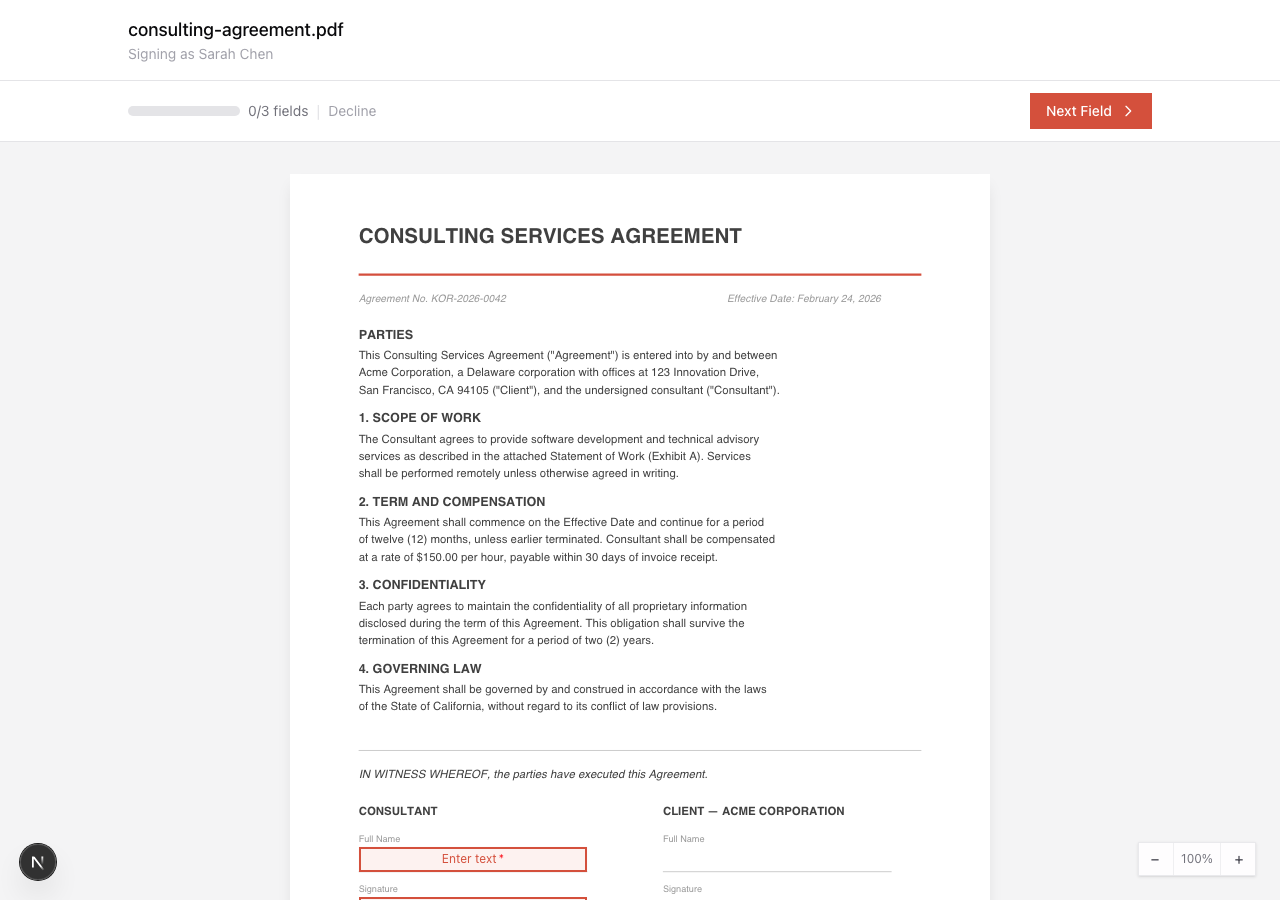
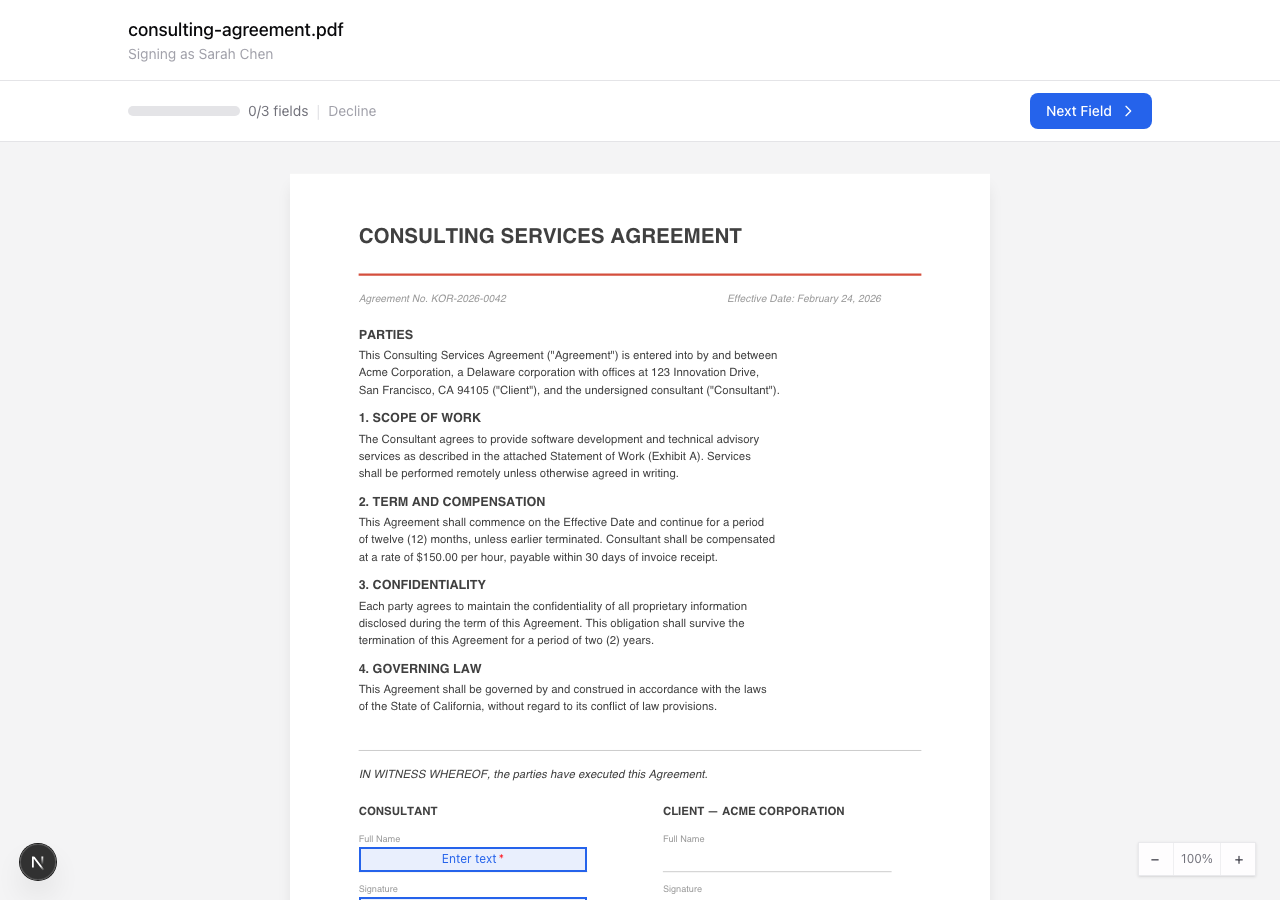
Match the signing UI to your brand by passing a theme prop. The theme replaces only accent-colored elements (buttons, field borders, focus rings); semantic colors (green success, red error, amber waiting) stay the same.
import { KoralaSigner } from '@korala/react';
import type { KoralaSignerTheme } from '@korala/react';

const theme: KoralaSignerTheme = {
  accentColor: '#2563EB',                      // hex color
  borderRadius: 8,                              // 0-24 px
  fontFamily: 'Inter, system-ui, sans-serif',   // CSS font-family
  backgroundColor: '#EEF2FF',                   // page background (hex)
  logoUrl: 'https://cdn.acme.com/logo.png',     // header logo (white-label plans)
};

<KoralaSigner
  token={signingToken}
  theme={theme}
  style={{ width: '100%', height: '100%' }}
  onSigned={(data) => console.log('Signed:', data.documentId)}
/>
Theme Properties
| Property | Type | Default | Description |
|---|---|---|---|
accentColor | string | #D4503C | Hex color for buttons, borders, and focus states |
borderRadius | number | 0 | Border radius in pixels (clamped 0-24) for buttons, modals, and inputs |
fontFamily | string | inherit | CSS font-family applied to the signing UI |
backgroundColor | string | platform default | Hex color for the page background |
logoUrl | string | none | HTTPS URL of a header logo. Requires a white-label plan |
All properties are optional. Without a theme, the signing UI uses the default Korala styling.
White-label (paid plans). logoUrl and hideAttribution apply only when the document’s organization is on a white-label plan. On other plans Korala ignores them and keeps the “Powered by Korala” footer. Accent, radius, font, and background work on every plan. Korala resolves the plan server-side, so passing these props from a non-entitled org changes nothing.
Default theme (coral accent, zero radius):
Custom blue theme (accentColor: '#2563EB', borderRadius: 8):
KoralaSignaturePad
A canvas-based signature drawing pad. Useful for capturing signatures before uploading them via the API.
import { KoralaSignaturePad } from '@korala/react';

function CaptureSignature() {
  const [signature, setSignature] = useState<string | null>(null);

  return (
    <KoralaSignaturePad
      width={600}
      height={200}
      penColor="#000000"
      onSignatureCreated={({ imageDataUrl }) => {
        setSignature(imageDataUrl);
      }}
      onClear={() => setSignature(null)}
    />
  );
}
Props
| Prop | Type | Default | Description |
|---|---|---|---|
width | number | 600 | Canvas width in pixels |
height | number | 200 | Canvas height in pixels |
penColor | string | #000000 | Stroke color |
className | string | None | CSS class for the container |
style | CSSProperties | None | Inline styles |
onSignatureCreated | (data) => void | None | Called with { imageDataUrl } (base64 PNG) when a stroke ends |
onClear | () => void | None | Called when the canvas is cleared |
Hooks
useKoralaEvents
Track the signing status and event history from any component. Useful when you need signing state outside the KoralaSigner component.
import { useKoralaEvents } from '@korala/react';

function SigningStatus() {
  const { status, events, lastEvent } = useKoralaEvents({
    signingUrl: 'https://app.korala.ai',
  });

  return (
    <div>
      <p>Status: {status}</p>
      <p>Events received: {events.length}</p>
      {status === 'signed' && <p>Document signed.</p>}
    </div>
  );
}
Status Values
| Status | Description |
|---|---|
loading | Initial state, waiting for iframe |
ready | Iframe initialized |
loaded | Document loaded in viewer |
viewed | Signer has viewed the document |
signing | The signer is filling a field |
signed | Signing completed |
declined | Signer declined |
error | An error occurred |
useKoralaSignerRef
Control the signing iframe from your own UI.
import { KoralaSigner, useKoralaSignerRef } from '@korala/react';

function ControlledSigner({ token }: { token: string }) {
  const { ref, close, getStatus, gotoField, gotoPage, getFields } =
    useKoralaSignerRef();

  return (
    <div>
      <KoralaSigner ref={ref} token={token} />
      <button onClick={close}>Close signing</button>
      <button onClick={getStatus}>Check status</button>
      <button onClick={() => gotoField()}>Go to next field</button>
    </div>
  );
}| Method | Returns | What it does |
|---|---|---|
close() | None | Closes the signing session |
getStatus() | KoralaGetStatusResult | Document status and progress counts |
gotoField(fieldId?) | KoralaGotoFieldResult | Scrolls to a field; omit the id for the next unfilled one |
gotoPage(pageNumber) | KoralaGotoPageResult | Scrolls to a 1-based page |
getFields() | KoralaGetFieldsResult | Every field: type, label, page, required, filled |
Navigation methods move the signer and nothing else. They will not fill a field, tick a checkbox, or open the signature pad. Your app cannot know what the signer can see, so it takes them to the field and leaves the acting to them.
Korala’s own navigation controls
Embeds hide the signing viewer’s page and previous/next-field controls by
default. Set showNavigation to render them instead of building controls in
your host app:
<KoralaSigner ref={ref} token={token} showNavigation />Direct signing links show the controls.
Checking what the viewer supports
The SDK and the signing app ship separately, so your app can be on a newer SDK
than the page it embeds. The ready event lists the commands the viewer
understands; older signing apps omit it and support only close and
get_status. Calling an unsupported command leaves its promise pending until
the SDK’s timeout, so feature-detect rather than assume:
const [commands, setCommands] = useState<string[]>([]);

<KoralaSigner
  ref={ref}
  token={token}
  onReady={(data) => setCommands(data.commands ?? [])}
/>;

{commands.includes('goto_field') && (
  <button onClick={() => gotoField()}>Go to next field</button>
)}
Building your own field navigation
Long agreements usually put the signature block in the last third of the
document. getFields and gotoField together let you put next/previous
controls, a field list, or a progress rail in your own chrome.
function FieldNavigator({ token }: { token: string }) {
  const { ref, gotoField, getFields } = useKoralaSignerRef();
  const [fields, setFields] = useState<KoralaFieldSummary[]>([]);

  // The list is available once the document has loaded.
  const load = async () => setFields((await getFields())?.fields ?? []);

  return (
    <div>
      <KoralaSigner ref={ref} token={token} onLoaded={load} onFieldFilled={load} />
      <ol>
        {fields.map((field) => (
          <li key={field.fieldId}>
            <button onClick={() => gotoField(field.fieldId)}>
              {field.label ?? field.fieldType}: page {field.pageNumber}
              {field.filled ? ' ✓' : ''}
            </button>
          </li>
        ))}
      </ol>
    </div>
  );
}
gotoField resolves once the viewer has stopped scrolling:
interface KoralaGotoFieldResult {
  fieldId: string | null;
  pageNumber: number | null;
  outcome: 'arrived' | 'unreachable' | 'not_found';
}
arrived means the field is on screen. not_found means no field matched the
id. unreachable means the viewer could not bring it into view. Surface that
outcome instead of treating it as success.
interface KoralaFieldSummary {
  fieldId: string;
  fieldType: string;
  label: string | null;
  pageNumber: number;    // 1-based
  required: boolean;
  filled: boolean;
  shared: boolean;       // another signer's field that you may fill
}

interface KoralaGetFieldsResult {
  fields: KoralaFieldSummary[];
  nextFieldId: string | null;  // what the signer's own button targets next
}
Events
The signing iframe sends events to the parent window via postMessage, each prefixed with korala:.
Event Payloads
Ready
interface ReadyEventData {
  version: string;  // Embed protocol version
  token: string;    // Signer access token
}
Consent Accepted
interface ConsentAcceptedEventData {
  documentId: string;
  signerId: string;
  consentedAt: string;  // ISO timestamp
}
Does not fire when ownConsent is set.
Document Loaded
interface LoadedEventData {
  documentId: string;
  documentName: string;
  signerName: string;
  signerEmail: string;
  totalFields: number;
  requiredFields: number;
}
Document Viewed
interface ViewedEventData {
  documentId: string;
  signerId: string;
  viewedAt: string;  // ISO 8601
}
Field Filled
interface FieldFilledEventData {
  fieldId: string;
  fieldType: string;           // 'signature' | 'initials' | 'date' | 'text' | 'checkbox'
  pageNumber?: number;         // 1-based page; absent on signing apps older than the SDK
  filledFields: number;
  totalRequiredFields: number; // live; see below
}
totalRequiredFields is a live denominator, not a constant. Choose-one
groups count as one unit, and a
conditionally required field
joins or leaves the count as the signer toggles its controller. Checking a
W-9’s LLC box raises it by one, unchecking lowers it. Render progress from
the latest event rather than caching the number from document.loaded.
Document Signed
interface SignedEventData {
  documentId: string;
  signerId: string;
  signedAt: string;       // ISO 8601
  redirectUrl?: string;
}
Document Declined
interface DeclinedEventData {
  documentId: string;
  signerId: string;
  reason?: string;
  declinedAt: string;  // ISO 8601
}
Error
interface ErrorEventData {
  code: string;
  message: string;
  recoverable: boolean;
}
Type Guard
Use isKoralaEvent to filter Korala events from other postMessage traffic:
import { isKoralaEvent } from '@korala/react';

window.addEventListener('message', (event) => {
  if (isKoralaEvent(event)) {
    console.log('Korala event:', event.data.type);
  }
});
Full Example
For a complete working app with single-signer, multi-signer, and batch countersign demos, see the example repository on GitHub .
A minimal signing flow: create a document via the API, then embed the signing experience.
import { useState } from 'react';
import { KoralaSigner } from '@korala/react';

export function SigningFlow() {
  const [status, setStatus] = useState<'form' | 'signing' | 'complete'>('form');
  const [token, setToken] = useState<string | null>(null);

  async function startSigning(name: string, email: string) {
    // Call your backend to create a document and get a signing token
    const res = await fetch('/api/create-signing-session', {
      method: 'POST',
      body: JSON.stringify({ name, email }),
    });
    const { signingToken } = await res.json();
    setToken(signingToken);
    setStatus('signing');
  }

  if (status === 'signing' && token) {
    return (
      <div style={{ height: '100vh' }}>
        <KoralaSigner
          token={token}
          signingUrl={process.env.NEXT_PUBLIC_KORALA_URL}
          style={{ width: '100%', height: '100%', border: 'none' }}
          onSigned={() => setStatus('complete')}
          onDeclined={(data) => {
            alert(`Signing declined: ${data.reason}`);
            setStatus('form');
          }}
          onError={(data) => {
            console.error('Error:', data.message);
            if (!data.recoverable) setStatus('form');
          }}
        />
      </div>
    );
  }

  if (status === 'complete') {
    return <p>Document signed.</p>;
  }

  return (
    <form onSubmit={(e) => {
      e.preventDefault();
      const fd = new FormData(e.currentTarget);
      startSigning(fd.get('name') as string, fd.get('email') as string);
    }}>
      <input name="name" placeholder="Name" required />
      <input name="email" type="email" placeholder="Email" required />
      <button type="submit">Start signing</button>
    </form>
  );
}